At the beginning of every year, I set up two spreadsheets in Excel. One is for our personal money management, and one is for each property’s expenses in the year (that will eventually be put into Schedule E in our taxes). I regularly mention using Excel to track your income and bills, so here’s a quick snapshot of what I do.
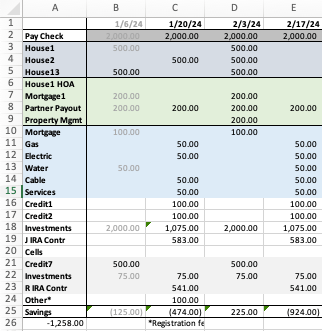
These are all dummy numbers, but otherwise, this is my spreadsheet set up (with several lines eliminated to reduce your visual clutter). The top purple section is rental income per house, the green section is rental property expenses, the blue section is our home’s bills, the gray section is what affect’s Mr. ODA’s account instead of our main checking account (Mr. ODA has his original account from before our marriage (I have access to view it) because of benefits associated with the linked credit card, and it was never worth closing it or adding my name to it). The white is what’s left over. The blue section is not necessary to be a different color and is left over from another way I tracked bills, but I’ve left it to differentiate home bills versus credits and investments.
The final line of “Other*” captures items that only occur once or twice a year, but have a significant impact on the checking account or is a deadline I want to be aware of. I keep the preschool registration fees on there so that it’s on my radar that registration comes due at about this time. In future months, I have taxes that are due for houses we have not escrowed, which is about $1500 worth in June and about $4000 worth in October.
The columns are organized by Mr. ODA’s pay check date. His pay check appears in the account every other Saturday, so that’s the date at the top. Then I’ve put all the income or expenses that align between that pay check’s date and the next pay check’s date in that column. This helps me project whether I’ll need a transfer from savings to cover the checking account balance. This particular section of the spreadsheet doesn’t show account balances, but you get the gist of the organization.
Each year, this is tweaked a little. I eliminate lines that are no longer necessary (for instance, our HOA is now paid annually, so I don’t need a line taking up space for a once-per-year bill). I add lines that become necessary (cable used to be paid by credit card, but now there’s a fee for that; since it affects our checking account monthly, it gets a line). It would probably be better to separate out my “investments” line into the specific transactions that happen each month, but I didn’t want more lines on my spreadsheet.
When rent is received or a bill is paid, I change the font color to gray. This indicates that it’s done and helps eliminate visual clutter for me. I can focus on the black font, which indicates to me it’s still due.
As I get closer to each pay check column, I update the projections. For example, a credit card may have had more than average expenses on it. This could happen because one credit card has a quarterly bonus for gas purchases. So while it’s typically $100 for a statement, it may be more like $200 because of the gas purchases on it. I update the projected payment because I need to monitor the checking account balance too. I also keep last year’s utility bill amounts in each column. I use this to track whether this year’s payment is comparable to last year’s at this time, so I know whether to look further into a bill because it’s significantly different than last year’s (for example, if last year’s June gas bill was $30, and this year’s June gas bill is $60, I want to check to see why it doubled, whether that means a leak or error in billing).
Every person’s tracking is going to look different. You may just have rent and utility bills to pay, and you can manage it via email notifications. You may want a more active approach to the tracking and use a spreadsheet in some fashion. This is just a start for you to have a visual in how a spreadsheet may be helpful in your money management, and may even help eliminate late fees or billing errors because you’re more actively managing your money.
 One Dollar Allowance