At the beginning of every year, I set up two spreadsheets in Excel. One is for our personal money management, and one is for each property’s expenses in the year (that will eventually be put into Schedule E in our taxes). I regularly mention using Excel to track your income and bills, so here’s a quick snapshot of what I do.
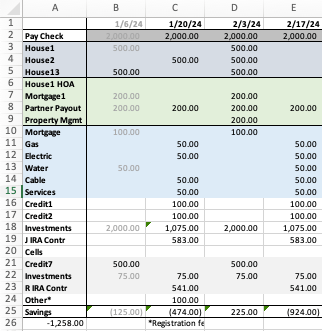
These are all dummy numbers, but otherwise, this is my spreadsheet set up (with several lines eliminated to reduce your visual clutter). The top purple section is rental income per house, the green section is rental property expenses, the blue section is our home’s bills, the gray section is what affect’s Mr. ODA’s account instead of our main checking account (Mr. ODA has his original account from before our marriage (I have access to view it) because of benefits associated with the linked credit card, and it was never worth closing it or adding my name to it). The white is what’s left over. The blue section is not necessary to be a different color and is left over from another way I tracked bills, but I’ve left it to differentiate home bills versus credits and investments.
The final line of “Other*” captures items that only occur once or twice a year, but have a significant impact on the checking account or is a deadline I want to be aware of. I keep the preschool registration fees on there so that it’s on my radar that registration comes due at about this time. In future months, I have taxes that are due for houses we have not escrowed, which is about $1500 worth in June and about $4000 worth in October.
The columns are organized by Mr. ODA’s pay check date. His pay check appears in the account every other Saturday, so that’s the date at the top. Then I’ve put all the income or expenses that align between that pay check’s date and the next pay check’s date in that column. This helps me project whether I’ll need a transfer from savings to cover the checking account balance. This particular section of the spreadsheet doesn’t show account balances, but you get the gist of the organization.
Each year, this is tweaked a little. I eliminate lines that are no longer necessary (for instance, our HOA is now paid annually, so I don’t need a line taking up space for a once-per-year bill). I add lines that become necessary (cable used to be paid by credit card, but now there’s a fee for that; since it affects our checking account monthly, it gets a line). It would probably be better to separate out my “investments” line into the specific transactions that happen each month, but I didn’t want more lines on my spreadsheet.
When rent is received or a bill is paid, I change the font color to gray. This indicates that it’s done and helps eliminate visual clutter for me. I can focus on the black font, which indicates to me it’s still due.
As I get closer to each pay check column, I update the projections. For example, a credit card may have had more than average expenses on it. This could happen because one credit card has a quarterly bonus for gas purchases. So while it’s typically $100 for a statement, it may be more like $200 because of the gas purchases on it. I update the projected payment because I need to monitor the checking account balance too. I also keep last year’s utility bill amounts in each column. I use this to track whether this year’s payment is comparable to last year’s at this time, so I know whether to look further into a bill because it’s significantly different than last year’s (for example, if last year’s June gas bill was $30, and this year’s June gas bill is $60, I want to check to see why it doubled, whether that means a leak or error in billing).
Every person’s tracking is going to look different. You may just have rent and utility bills to pay, and you can manage it via email notifications. You may want a more active approach to the tracking and use a spreadsheet in some fashion. This is just a start for you to have a visual in how a spreadsheet may be helpful in your money management, and may even help eliminate late fees or billing errors because you’re more actively managing your money.
I manage all our income and expenses (at a high level, like credit card payments, not individual line items). I have a spreadsheet that I set up in 2012 and have used religiously since then. I’ve shared how I set it up in the past, but we’ve entered a new phase that makes my spreadsheet even more important to me.
BACKGROUND
FIRE. Financial Independence, Retire Early. This isn’t a post about FIRE specifically, although it’s the movement that sparked Mr. ODA to go down our financial path.
The purpose of our rental portfolio was always for both Mr. ODA and I to quit working. We had covered my income before any kids were born, but I kept working because there was no reason to not be working. Once our son was born, I took 14 weeks maternity leave (not a separate bucket for Federal employees back in 2018; it came out of my own accumulated sick leave), then I worked about every other day for 8 months while Mr. ODA and I swapped child care roles, and I burned down my leave.
While we don’t plan to work full time, we do plan on keeping part time positions. We’ll work on things that bring us joy, rather than an office job with office politics. Since I stopped working, I’ve done odd jobs, part time. For example, I worked as a census taker and served beer at a local race track over the last 4 years. These were all seasonal, part time positions, with no long term commitment.
Now that I quit working, it’s Mr. ODA’s turn. We hardly skipped a beat when we left my six-figure salary behind (although a pandemic probably helped curtail spending on our behalf!). However, the thought of losing his salary as a safety net and losing insurance are two items that have caused some pause.
THE SPREADSHEET
For you to understand my panic that I’ll get into here, I thought a quick reminder was necessary. This is how I manage our money. It’s nothing fancy, but it works. I don’t miss payments. I can allocate expenses to a specific 2-week period against what income is brought in at that time.
There are two parts to the spreadsheet. Well, there are about 10 tabs, but this first tab, with two sections, is what’s pertinent.
Part 1 is this section. This image is a very scaled down version of the section. We have 13 houses, 6 mortgages that get paid, 6 credit cards that get paid regularly, and a few other lines that I removed.
All numbers are made up place holders, except the investments. I deleted my IRA contribution line because it’s wonky (but I will max out IRA contributions), but I wanted to show how much we’re investing regularly. There’s $75, per kid, per month, going into their investment accounts. Then there’s general investing happening with one $1000 transaction and two $800 transactions per month. Mr. ODA is investing into his IRA to max it out ($6500/12=$541 per month..sort of).
You can see that I’ve listed Mr. ODA’s pay dates at the top, and then his salary income on the next line. The gray section accounts for all rental income. I’ve allocated the income into the salary two-week period that makes the most sense (about half pay me on the 1st or 2nd, and the rest pay on the 5th). The green section shows routine rental property expenses. The entire next section are our personal expenses. The blue is left over from when I was managing two personal homes last summer (but kept it to differentiate our house bills versus other bills). The next gray section (which I’m only just realizing is a second gray and should be a different color as to not conflate the two grays.. what a rookie mistake) accounts for expense that come out of Mr. ODA’s bank account. Finally, I have an “other” section. This is where I capture large expenses that don’t need their own line item because they only happen once or twice a year. Here I’ve put tax payouts that will be due in October (that’s 4 houses worth, and it’s last year’s numbers – because I want to know how this year’s amount owed, when it comes in, changed from last year’s to discern if it’s reasonable or if I need to dig into it).
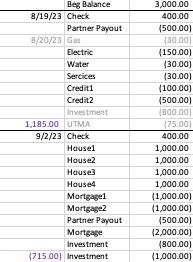
This is part 2. Now, part 1 accounts for the general timing of income and expenses, but it doesn’t perfectly capture the due dates, scheduled payments, or whether I’ve paid it and it’s hit the account.
The top line is linked to the section that I update our checking and savings account balances. Then I transfer all the items per pay period into this list format. In this example, let’s say I’ve already scheduled the gas payment. So I mark it as gray and put the date in the left column. Similarly, our investments are automatic, so I mark them in gray as we get to that two-week period.
At each border lined, I put the total for that section. You can see that at the end of the 9/2/23 pay period, I project a negative balance. Truly, we seem to have more income than I project (rewards cashed out, someone paying partial rent a little early, etc.), so I don’t take any action until I need to. There are Federal regulations regarding savings accounts; so we can only make 6 withdrawals from the savings account before fees apply. I manage these projects to know whether I need to make a withdrawal. If I need to, then I project what other expenses I may have and transfer a little more than I deem necessary.
THE PLAN
So our first step to him leaving is to pretend we don’t have his salary. Mr. ODA set up a new bank account. The majority of his paycheck goes into that account. We still have $250 going into another account, and about $400 going into a third account because we need to meet the requirements of direct deposits to prevent any account maintenance fees.
Our general principals in account management was always to take money into our main checking account, pay out bills for that two week period, and put the balance into savings. However, that wasn’t creating any forced feeling of managing without Mr. ODA’s salary. I’m more of a visual learner, so I appreciated this concept of having the money automatically transferred to a completely separate account.
EXECUTION OF THE PLAN
The first month of this plan had me on edge. The accounting in the checking account meant I was constantly back down to a balance of about $500. When I worked in an office, I was at the computer everyday checking our money. Now that I’m responsible for 3 tiny humans, I’m rarely on the computer. I project out our routine expenses, but there have been plenty of times where a $100 or $500 charge goes through that I didn’t have listed in my expense column for that period. Therefore, I like to keep at least $1000 as a buffer in the checking account to cover those little expense that can add up. So keeping the projection to less than $500 in the checking account panicked me.
Now wait. It’s not that we only had $500. We have a savings account linked to that checking account. We have this online account that’s taking Mr. ODA’s salary and just building the balance because we don’t use that account for anything. We have Mr. ODA’s old personal checking account. And last but not least (as my adorable 3 year old says all day long), we have plenty of investments that can be liquidated within 24 hours. We have the money. It’s just the panic of having the money in the spot where the bills are being paid.
SUMMARY
I’m sure there are easier ways or “better” ways to account for this. I don’t like automatic payments for bills because I like scheduling them against our cash flow. I’ve used this exact set up since 2012, and it hasn’t failed me. Taking full responsibility to pay bills means I am very scared to miss a payment and cause a negative hit on either of our credit reports.
Now that we’ve eliminated about $5,000 per month of income, without changing our spending in any way, I’m interested to see how things go. We have a great spending mentality – we’re not spending on frivolous items and we weigh the cost benefit of a purchase to us. That’s not to say we can’t do better. I’m sure we can be more diligent about our grocery spending or at least cooking what we already have in the house (we don’t spend much at restaurants in a month). I’ve already started tracking our expenses month to be sure we can watch our trends and re-evaluate our spending if needed.
Now that we have this account growing with no need for it to pay the bills, we will use it for fun things. We’re not very good about doing fun things. Two summers ago, we wanted to buy a vacation home at a nearby lake. We decided that instead of spending $1200 per month on a mortgage to go to the same place all the time, we’d plan vacations each month and spend up to $1200 without “guilt.” It was great. We had so much fun. But it lasted 3 months. Having a newborn put a damper on activities, but we’re ready to do the same again.
In January, I mentioned how I have a very detailed spreadsheet to track my expenses. I started this spreadsheet concept in 2012 when my husband and I started combining living expenses. We also moved from NY to PA to a VA apartment to a VA house in a matter of 22 months. I needed to have a way to make sure I didn’t miss any bills. I didn’t want to rely on receiving the bill itself in the mail or in my email before paying it. I chose to develop the spreadsheet based on our pay check dates, which were every 2 weeks.
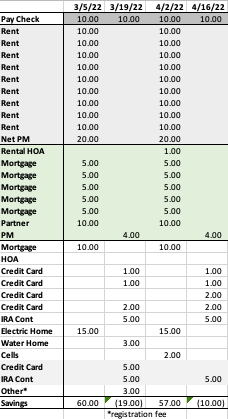
Here’s my sheet, in essence. Pay no attention to the actual numbers in this screenshot, as I didn’t take the time to make sure they were made up but still proportioned to each other. The format is exactly as I use it though. I set it up at the beginning of each year.
For the entire year, I record the pay check receipt across the top of the sheet. The dates are based on the day the money hits our account. This has changed over the years, as we used to get paid on Tuesdays, but now Mr. ODA’s pay check shows up in our account on a Saturday.
The first section, which is all gray, is the rental income. I then record all the rental income near the 1st of the month. If a pay check isn’t near the first of the month, I record it for any pay check date that shows up in the first 10 days of the month. Realistically, I receive the majority of our rent on the 5th of each month, so it doesn’t make sense to record it as a projection any earlier than the 1st, and as near the 5th as I can. The ‘Net PM’ is because I don’t collect rent on our KY houses; the property manager collects rent, removes their expenses, and then we receive the net by the 10th of the following month.
The next section is the light green, which captures routine expenses on the rental properties. I record the HOA due date every 3 months, each month’s mortgage payment, the payout to our partner (I take in all the rent each month and then pay him out his half plus our half of the mortgage payment), and then the VA property manager’s expenses.
The white section covers all our personal expenses. – The bottom two gray lines are simply an indication to me that those affect Mr. ODA’s account and not our main checking account. – I pay our personal mortgage near the 1st of the month (some time between the 1st and the 10th, but I typically prioritize this getting paid as close to the 1st as possible). – Our personal residence’s HOA is only due one per year, which is why there’s nothing on that line for this particular snapshot. – Then I have all our credit card payments. For the year, I project based on the previous year’s average bill. As I get closer to the statement end period, I update the projection. If I project that a credit card bill is going to be $1000, but as we spend through the month, we had more expenses than I thought, I update the projection on the spreadsheet to reflect that. So where it said $1000, I may put $1700 to cover my savings projection. – I project our my utilities too. I know that I have an electric and water bill each month, and I have a cell phone bill that I pay in 3-month increments to my sister-in-law for a family plan. When setting up the sheet for the year, I simply keep the same numbers from last year for the utility lines. While I can log into my account and see the details, it’s easier if I already have it laid out like this. Then I can see, “last year, for this month, my bill was only $40; why is it $70 now?” One caveat here is that I usually keep the lines on this sheet to those items that are going in or coming out of our checking accounts. The water bill can now be paid by credit card (since we moved to KY last year). Technically, I should remove that from the sheet because I track bill due dates separately from this part of the sheet, but since I’m used to tracking the water bill’s due date like this, and I like seeing how the bill changes from last year’s amount due, I’ve kept it on the list. – I have our IRA contributions listed as well, since that’s a big chunk that comes out each month. The maximum contribution into a Roth IRA is $6,000. We have automatic contributions twice per month, so that’s actually $500 out of each ‘pay check’ grouping. – The “other” line is for expenses that happen every year, but they aren’t worth having individual lines because there’s only one or two payments per year. As I type that, perhaps my own HOA payment could be added to the other line since it’s only paid once per year. In Virginia, we had personal property tax that would be due each year. We also have our taxes that we owe (because we purposely plan our taxes so that we don’t get a refund because that means you’ve given Uncle Sam an interest free loan). We have vehicle registration fees due. All these ‘one off’ payments are recorded on the “other” line and then I describe the expense two lines below with the asterisk.
As for the savings projection, this is probably mislabeled. It has always said ‘savings,’ but it’s really just the net of that two-week period’s income and expenses. To know if I’m in good shape (if perhaps I’m in a position where my account balance is being kept really low), I net the two ‘savings’ next to each other (so I would add the $60 and the -$19 to know that my income from that first two-week period will cover my expenses for the second two-week period also).
In practice, as I receive the income or I pay a bill, I change the text from black to gray. This tells me that it’s paid and accounted for. I also update to actuals as I go. So if I projected a credit card payment to be $150, but the actual payment was $147.34, that’s what gets put in the sheet when I make the payment. This helps me track actual amounts through the year, as well as sets myself up to create projections for the next year.
I have a separate tab in my workbook that tracks additional income for the year. For example, when I was working part time, I recorded that income on that other spreadsheet. Each time we get money from our credit card rewards, it gets recorded on my income spreadsheet. By keeping track of our additional, unplanned, income, I have the ability to identify our actual savings net for the year. I take the ‘savings’ bottom line from this spreadsheet and add all the additional income we’ve brought in from the other sheet.
While I’m not budgeting the details of our expense categories (e.g., $300 per month for groceries), I’m tracking my income and overall expenses based on bill payments. Last year, I had tracked my expenses by category to see if overspend in one area in particular. I didn’t keep up with it though because the billing cycles didn’t line up with when I’d be running my financial update, but I hope to get in a better grove this year. This set up makes me feel comfortable that I’m not missing a bill. If I get to the end of a 2-week period, and I haven’t grayed out an amount, then I know it’s time to investigate why I didn’t receive mail or an email prompting me to pay a bill. Usually what happens is I’m tracking Mr. ODA’s credit card payment and wondering how much longer he’s going to wait to pay it until the due date. 😛
I hope that was easy to follow. I don’t want to put all our exact numbers in there, but I wanted to share how I “budget.” If you have any questions, don’t hesitate to reach out!

 One Dollar Allowance